What to do if order/sold count is not being displayed?
If the order/sold count is still not displaying after the snippet has been added to the liquid file.
Please follow the steps below:
1. Navigate to one of the product page on your store.
2. Right click on the page, and click on Inspect.
3. Select the Console.
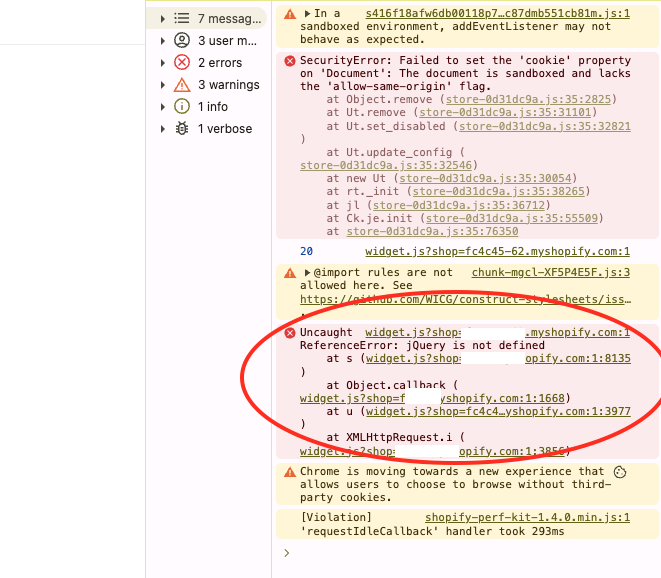
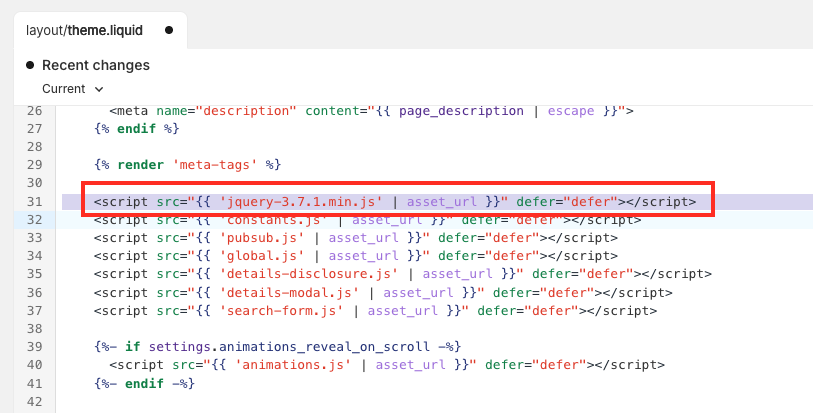
4. If you see the error above: jQuery is not defined, navigate to the theme.liquid. You will need to add the jQuery tag in the file.
Related Articles
Welcome to NEON
NEON allows you to display sold count on your products' page. This will increase your customers' confidence to buy your product. NEON has a very simple dashboard where you will be able to do everything from loading order/s to configuring the NEON ...NEON Privacy Policy
NEON Privacy Policy NEON "the App” provides sold count to increase conversion rate "the Service" to merchants who use Shopify to power their stores. This Privacy Policy describes how personal information is collected, used, and shared when you ...Uninstall NEON
1. First, you need to remove the snippet that you paste in your theme.liquid. Ctrl + F this query neon-stock-info-widget and remove the whole div class. NOTE: Please remove the above snippet of code in order to remove the app completely, prior to ...