Fulfillment Tracking Visibility
Control when tracking updates become visible to customers based on each carrier's shipment status. This feature allows you to delay fulfilment updates until a shipment reaches a specific tracking.

When Fulfillment Tracking Visibility is enabled:
- Tracking information will only be displayed once the shipment reaches the configured carrier's selected status.
- You can define different visibility statuses for different carriers.
- Any carrier that is not explicitly configured will default to Delivered before fulfillment information becomes visible.
How to setup:
- Navigate to Advanced settings page > Fulfillment Tracking Visibility.
- Check Enable Fulfillment Tracking Visibility.
- Select a carrier from the Carrier dropdown.
- Choose the shipment status that must be reached before tracking updates are shown.
- Click Add carrier to configure additional carriers if needed.
- Save your changes.
Example Configuration
| Carrier | Visibility Status |
|---|---|
| DHL Express | Delivered |
| USPS | Departure |
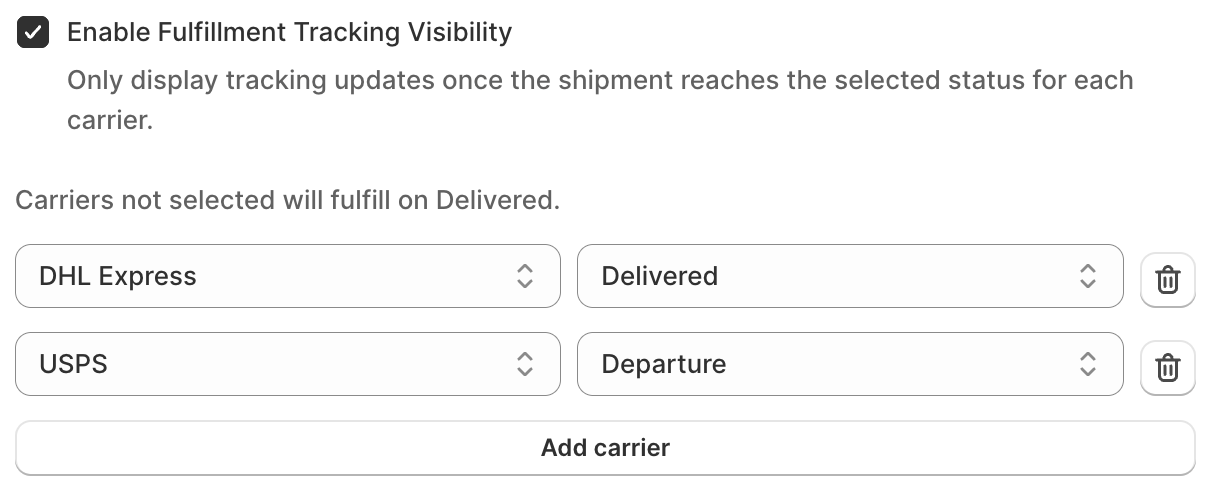
- DHL Express tracking information will only become visible once the shipment is marked as Delivered.
- USPS tracking information will become visible once the shipment reaches the Departure status.
Related Articles
Fulfillment Log
The Fulfillment Log interface displays order fulfillment details for the last six months. Users can export data to a CSV file for either the past three or six months. There are options to filter orders, including: "Show all" button to display all ...What is Partial Fulfillment?
After your customer makes an order, you need to ship it. This process is referred to in Shopify as order fulfillment. Partial Fulfillment is when you are trying to deliver a part of the customer's order. To enable partial fulfillment, you must also ...Paypal sync tracking info
syncX: Easy Fulfill Tracking is able to sync the tracking info of orders that are fulfilled (with Easy Fulfill Tracking) to PayPal. 1. Navigate to https://developer.paypal.com/ and login with your Paypal account. 2. Navigate to the Live section to ...Why syncX: Fulfill Tracking queuing take so long?
The Queuing duration is determined by the number of processes running in the background. You might notice sometimes your process runs within minutes while sometimes it will take an hour. This is because there are many other users are in the queuing ...What if my products do not have SKU when the order is created?
If an SKU is not available, we will fulfill all products from the same order with the same tracking information. In other words, partial fulfillment does not work under this circumstance at the moment.