What is Partial Fulfillment?
After your customer makes an order, you need to ship it. This process is referred to in Shopify as order fulfillment.
Partial Fulfillment is when you are trying to deliver a part of the customer's order. To enable partial fulfillment, you must also map the item SKU and quantity column.
For example,
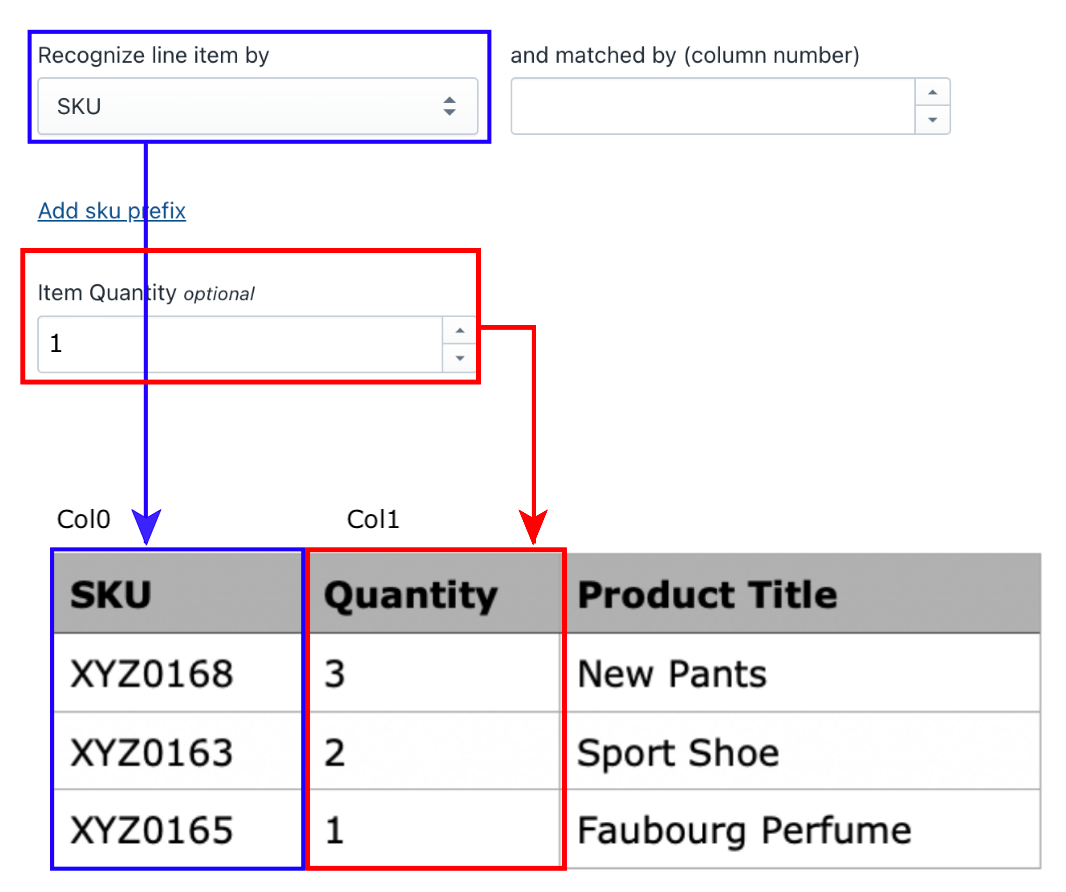
A customer ordered 3 pants with SKU XYZ0168 and 2 Sports Shoes with SKU XYZ0163.
But when you try to fulfill that order, you realize that the postage/shipping of both SKUs is different.
So you want to update the tracking number to the customer separately.
By mapping the Item SKU during source setup, Fulfill Sync can perform partial fulfillment. You must map the item quantity using the column index in the example above using column index 1.
Related Articles
Fulfillment Log
The Fulfillment Log interface displays order fulfillment details for the last six months. Users can export data to a CSV file for either the past three or six months. There are options to filter orders, including: "Show all" button to display all ...What if my products do not have SKU when the order is created?
If an SKU is not available, we will fulfill all products from the same order with the same tracking information. In other words, partial fulfillment does not work under this circumstance at the moment.Fulfillment Tracking Visibility
Control when tracking updates become visible to customers based on each carrier's shipment status. This feature allows you to delay fulfilment updates until a shipment reaches a specific tracking. When Fulfillment Tracking Visibility is enabled: ...Set up Mapping and Configuration
First and most necessary step is to recognise your order by any of these: Mapping can be matched using your column number or index. Note that the column number starts at 0 (see the sample file attached below). Next, you can update your tracking ...Set up Advanced Settings
Advanced settings include order filtering, order information updates, file format configuration, order duration settings, and find/replace functionality. Paid status Select the desired paid status to filter orders accordingly. Filter by column index ...